During crypto purchases on CoinW, you may occasionally encounter order-related disputes. In such cases, you can use the appeal feature to report and resolve the issue.
Here’s how to file an appeal for a problematic order:
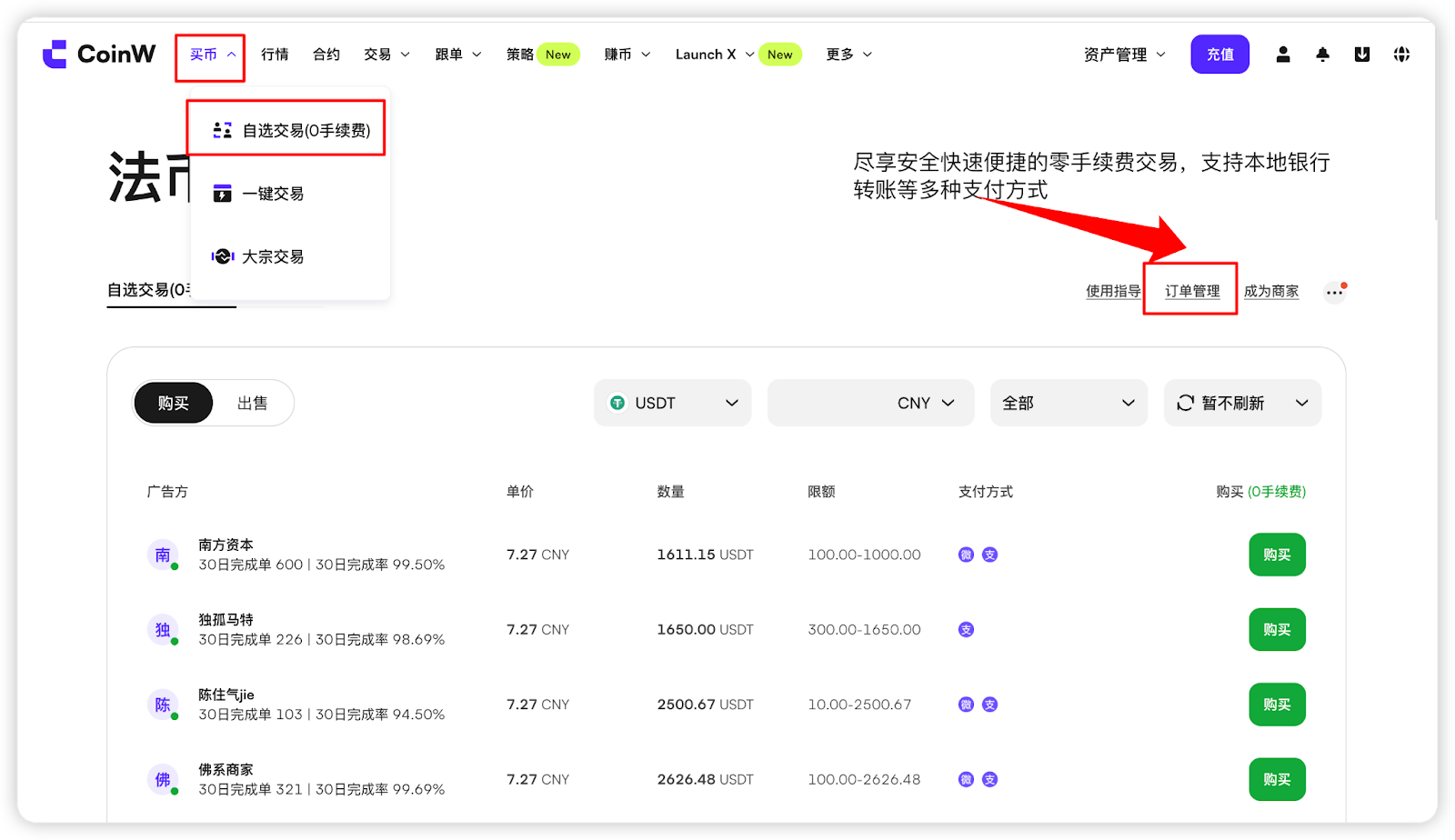
(1) Enter the crypto purchase interface:
Go to https://www.coinw.com/p2p-trading/personalized/buyand tap the “Order Management” button in the top right corner to access the order management page.
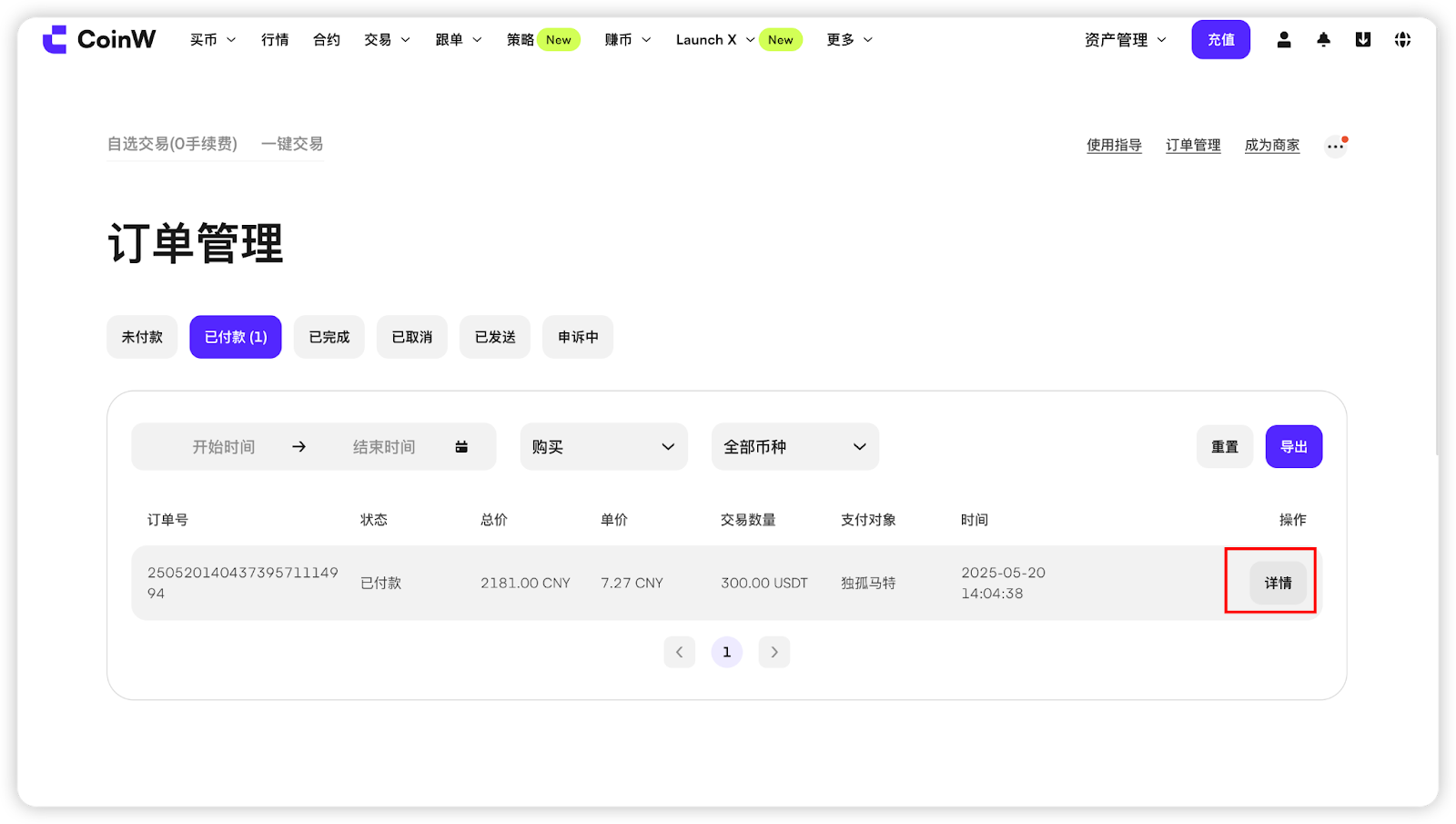
(2) Locate the order you want to appeal, then click the “Details” button next to it.
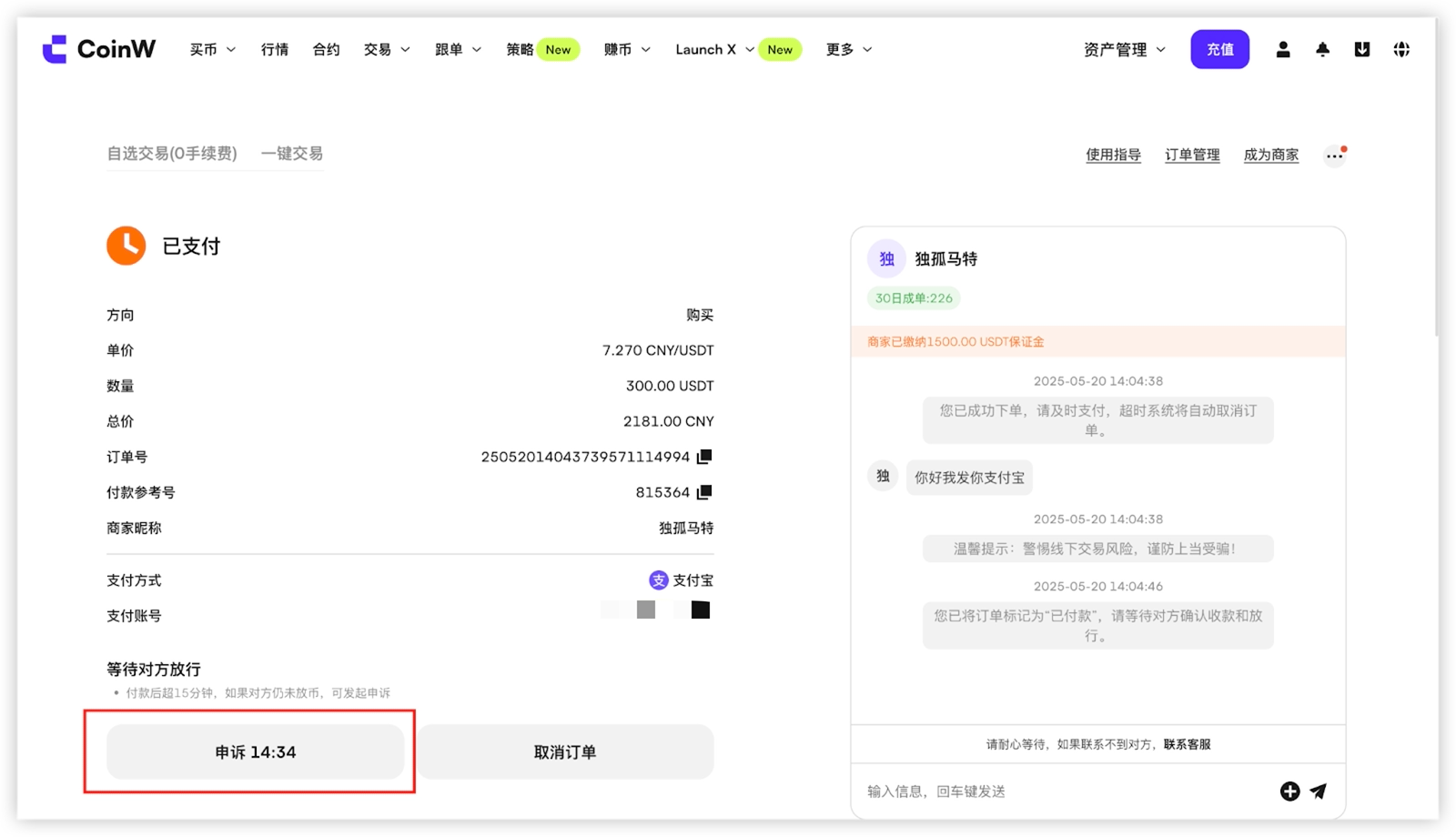
(3) On the order details page, click the “Appeal” button to submit an appeal.
When submitting, please upload relevant evidence and clearly describe the reason for the appeal.
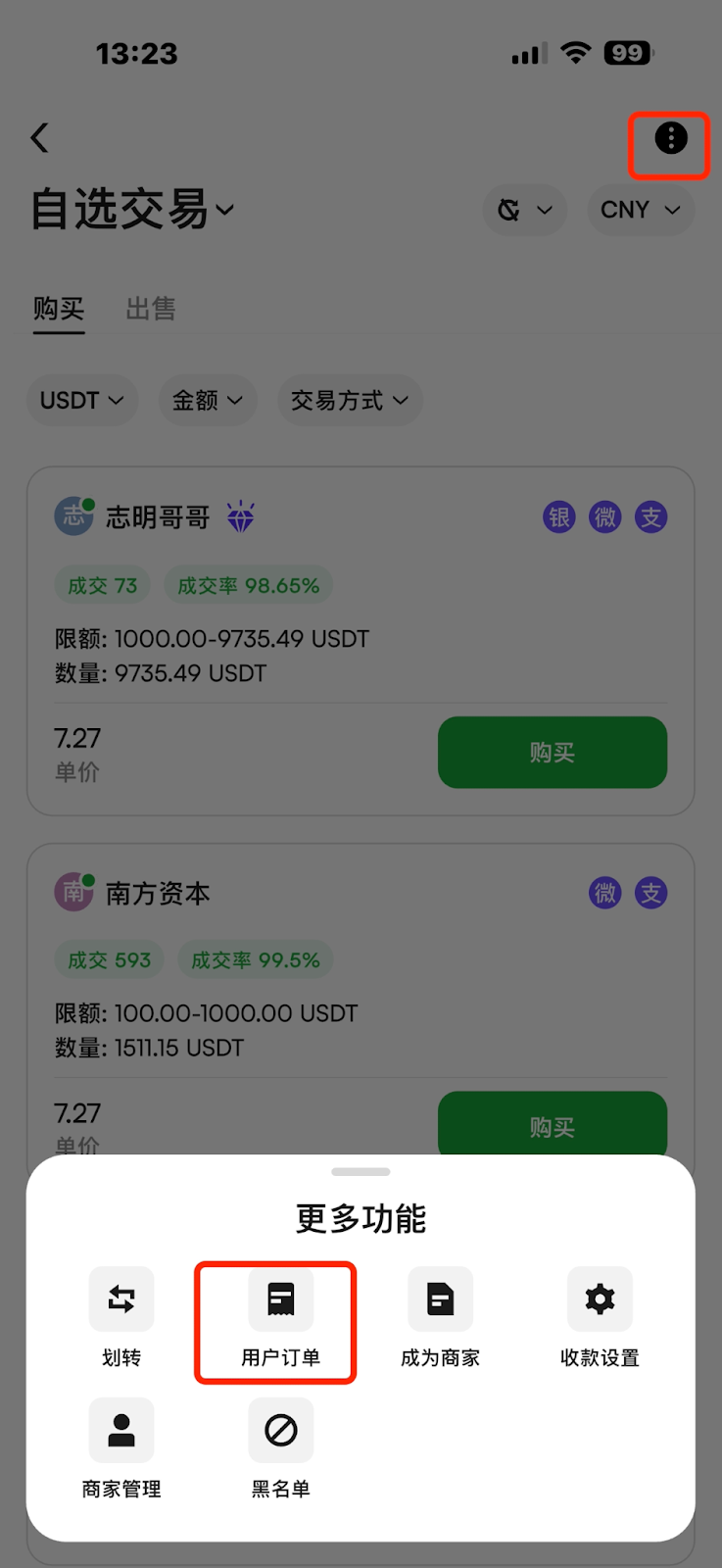
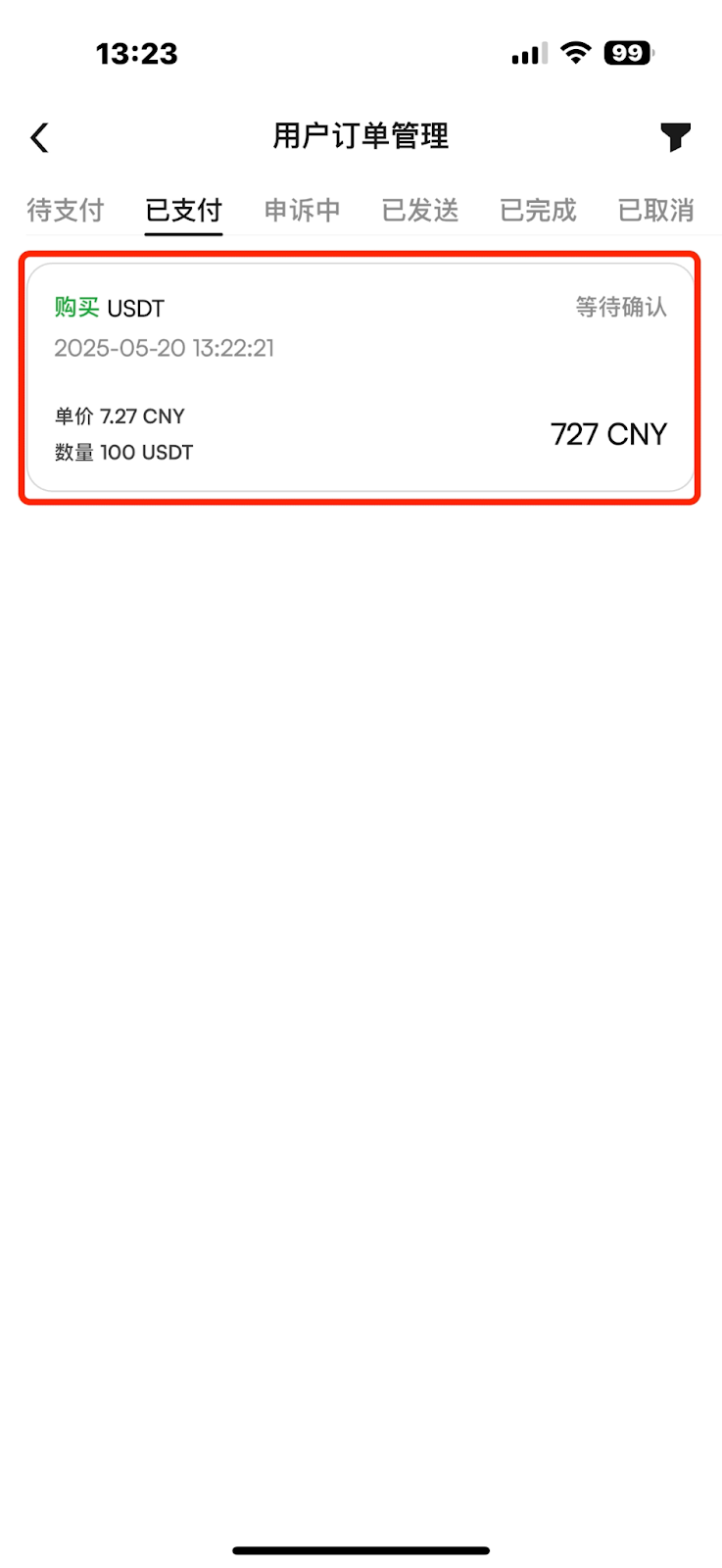
(1) Enter the crypto purchase interface and tap the three dots in the upper-right corner.
(2) Select "User Orders" from the menu.
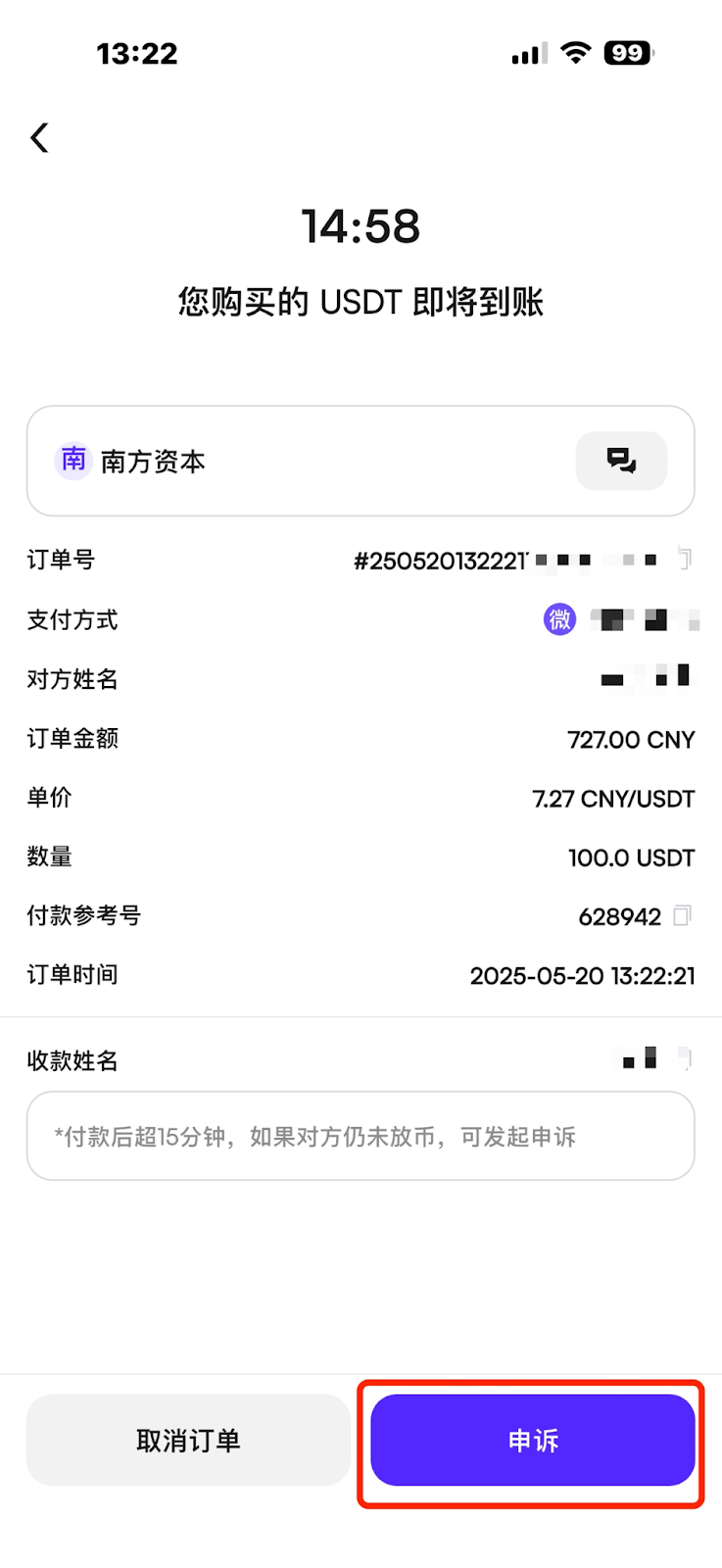
(3) Find the order you wish to appeal, enter the order details page, and tap the “Appeal” button to initiate an appeal.
When submitting the appeal, please upload relevant evidence and clearly describe the reason for the appeal.
(1) If the buyer clicks “I have paid” without actually making a payment in an attempt to maliciously freeze the order, the platform reserves the right to suspend the user’s access to fiat trading for a certain period.
(2) If the seller receives payment but fails to confirm it in a timely manner, and remains unreachable even after the platform's attempts to contact them following a buyer's appeal, the platform reserves the right to suspend the seller’s fiat trading privileges for a certain period.
(3) If a user receives multiple complaints or frequently cancels orders due to personal reasons, the platform reserves the right to restrict that user’s fiat trading eligibility.
(4) If one party disputes a transaction and the other party submits an appeal along with sufficient supporting evidence, the platform has the right to provide the appellant with the contact details of the other party for further communication. The platform may also suspend the respondent’s trading and withdrawal privileges.
(5) If the respondent is repeatedly unreachable or clearly uncooperative, and evidence shows that the appellant has suffered financial loss, the platform may transfer the digital assets to the party that has provided sufficient and valid evidence. In such cases, the respondent may be permanently banned from fiat trading.
(6) If a user is found to be involved in activities that violate anti-money laundering regulations—such as using illegally obtained funds through financial fraud or submitting fake payment/receipt proofs—the platform will permanently ban that user from fiat trading upon verification.
(2) If the buyer has completed the payment but fails to click “I have paid” in time—causing the order to be automatically canceled or mistakenly canceled manually—the buyer should file an appeal promptly and submit payment proof. The platform will assist with the issue.
(3) If the seller does not confirm the receipt and release the cryptocurrency within one hour after the buyer has successfully made payment, the buyer may submit an appeal along with relevant evidence, and the platform will assist in handling the case.
(4) The seller must click “Confirm Receipt” and release the crypto only after confirming the payment has been received and verified.
(5) If the seller mistakenly releases the crypto without actually receiving the payment, they should immediately file an appeal and explain the situation. The platform will assist in resolving the issue.
During crypto purchases on CoinW, you may occasionally encounter order-related disputes. In such cases, you can use the appeal feature to report and resolve the issue.
Here’s how to file an appeal for a problematic order:
(1) Enter the crypto purchase interface:
Go to https://www.coinw.com/p2p-trading/personalized/buyand tap the “Order Management” button in the top right corner to access the order management page.
(2) Locate the order you want to appeal, then click the “Details” button next to it.
(3) On the order details page, click the “Appeal” button to submit an appeal.
When submitting, please upload relevant evidence and clearly describe the reason for the appeal.
(1) Enter the crypto purchase interface and tap the three dots in the upper-right corner.
(2) Select "User Orders" from the menu.
(3) Find the order you wish to appeal, enter the order details page, and tap the “Appeal” button to initiate an appeal.
When submitting the appeal, please upload relevant evidence and clearly describe the reason for the appeal.
(1) If the buyer clicks “I have paid” without actually making a payment in an attempt to maliciously freeze the order, the platform reserves the right to suspend the user’s access to fiat trading for a certain period.
(2) If the seller receives payment but fails to confirm it in a timely manner, and remains unreachable even after the platform's attempts to contact them following a buyer's appeal, the platform reserves the right to suspend the seller’s fiat trading privileges for a certain period.
(3) If a user receives multiple complaints or frequently cancels orders due to personal reasons, the platform reserves the right to restrict that user’s fiat trading eligibility.
(4) If one party disputes a transaction and the other party submits an appeal along with sufficient supporting evidence, the platform has the right to provide the appellant with the contact details of the other party for further communication. The platform may also suspend the respondent’s trading and withdrawal privileges.
(5) If the respondent is repeatedly unreachable or clearly uncooperative, and evidence shows that the appellant has suffered financial loss, the platform may transfer the digital assets to the party that has provided sufficient and valid evidence. In such cases, the respondent may be permanently banned from fiat trading.
(6) If a user is found to be involved in activities that violate anti-money laundering regulations—such as using illegally obtained funds through financial fraud or submitting fake payment/receipt proofs—the platform will permanently ban that user from fiat trading upon verification.
(2) If the buyer has completed the payment but fails to click “I have paid” in time—causing the order to be automatically canceled or mistakenly canceled manually—the buyer should file an appeal promptly and submit payment proof. The platform will assist with the issue.
(3) If the seller does not confirm the receipt and release the cryptocurrency within one hour after the buyer has successfully made payment, the buyer may submit an appeal along with relevant evidence, and the platform will assist in handling the case.
(4) The seller must click “Confirm Receipt” and release the crypto only after confirming the payment has been received and verified.
(5) If the seller mistakenly releases the crypto without actually receiving the payment, they should immediately file an appeal and explain the situation. The platform will assist in resolving the issue.