FAQ
WEB
(1) Select a Trading Pair
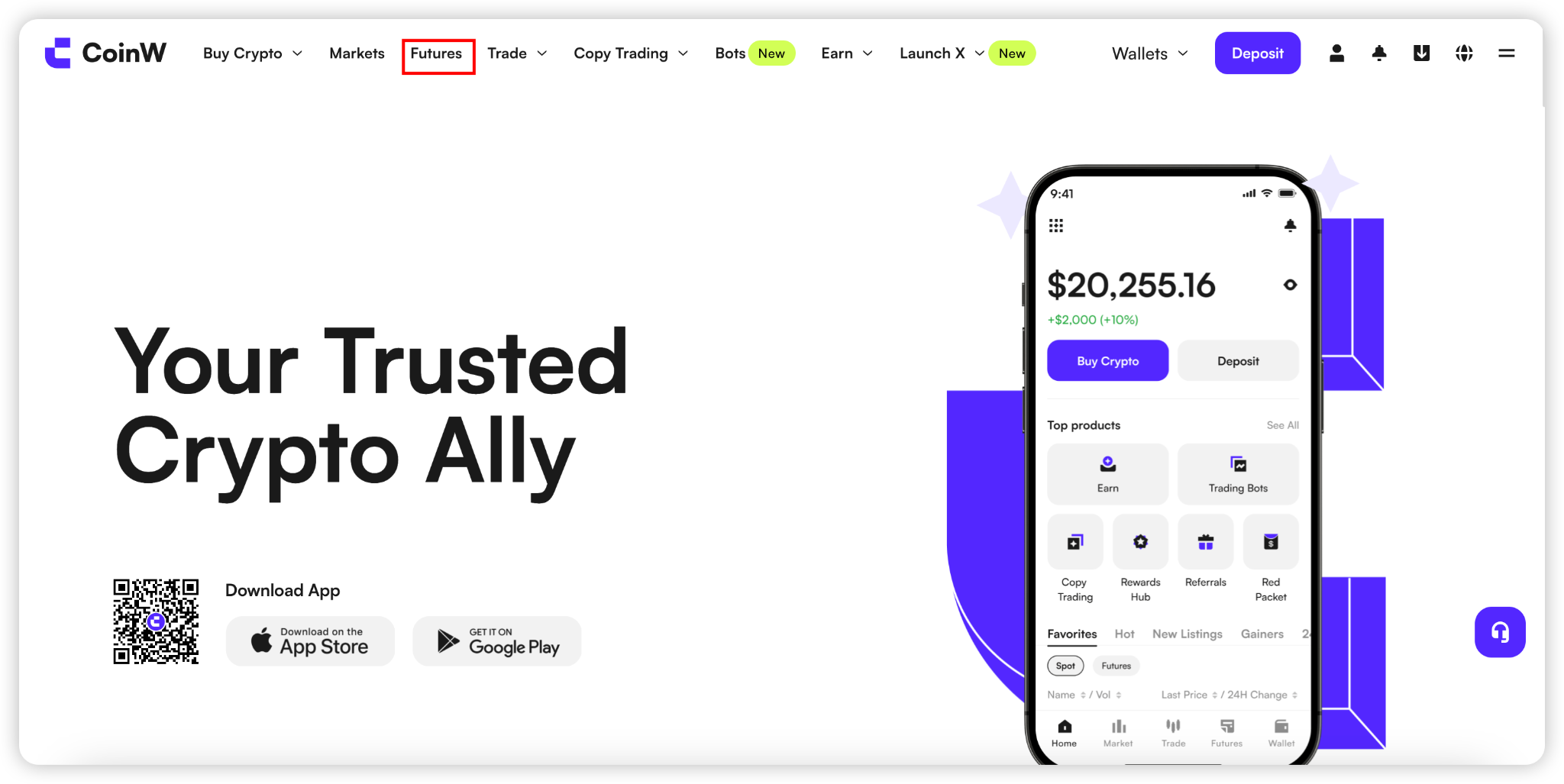
Log in to the CoinW official website:https://www.coinw.com/
Click on the “Futures” in the top navigation bar
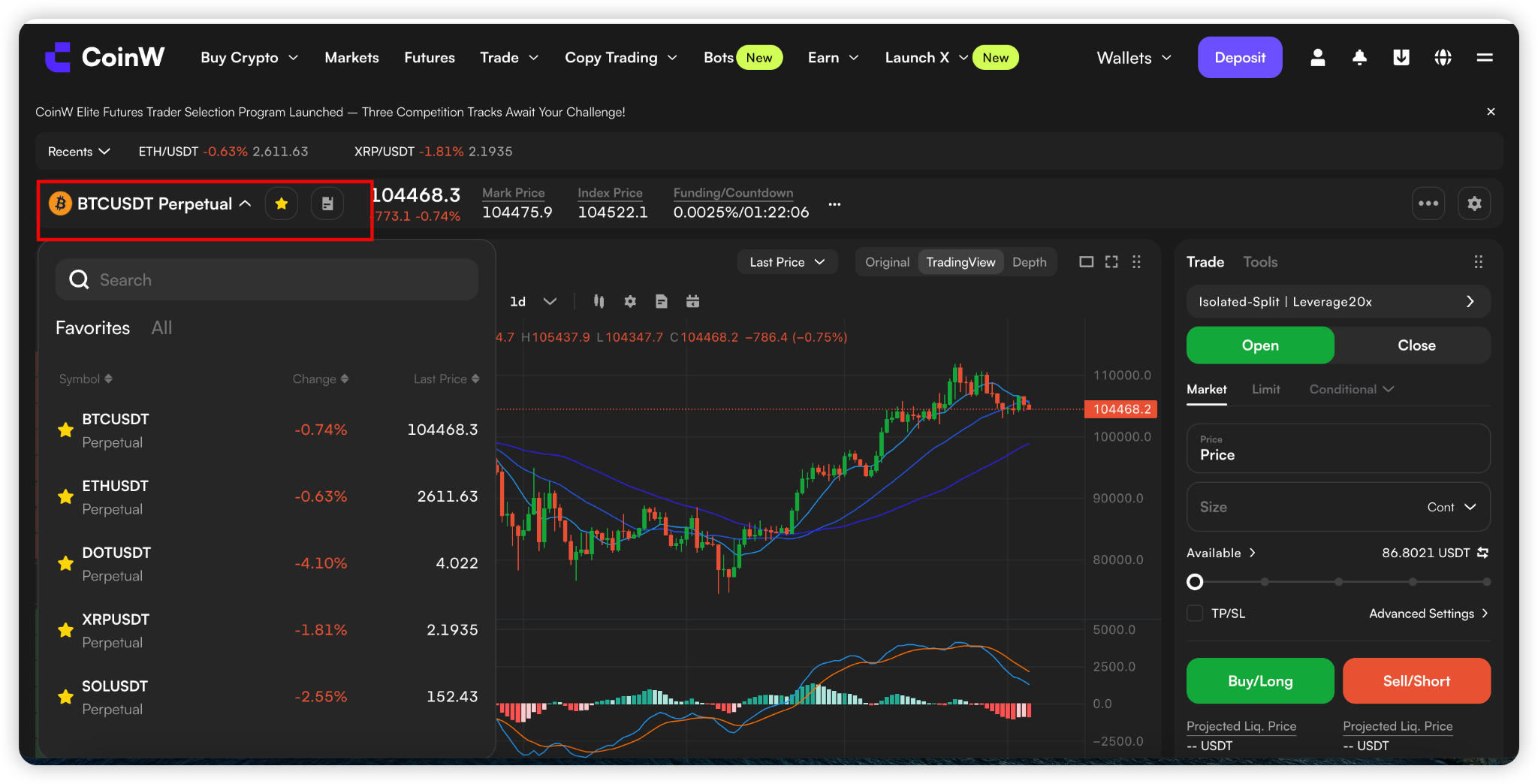
Click the trading pair button at the top left corner of the page, and select the trading pair you want to trade with.
(2) Transfer Funds
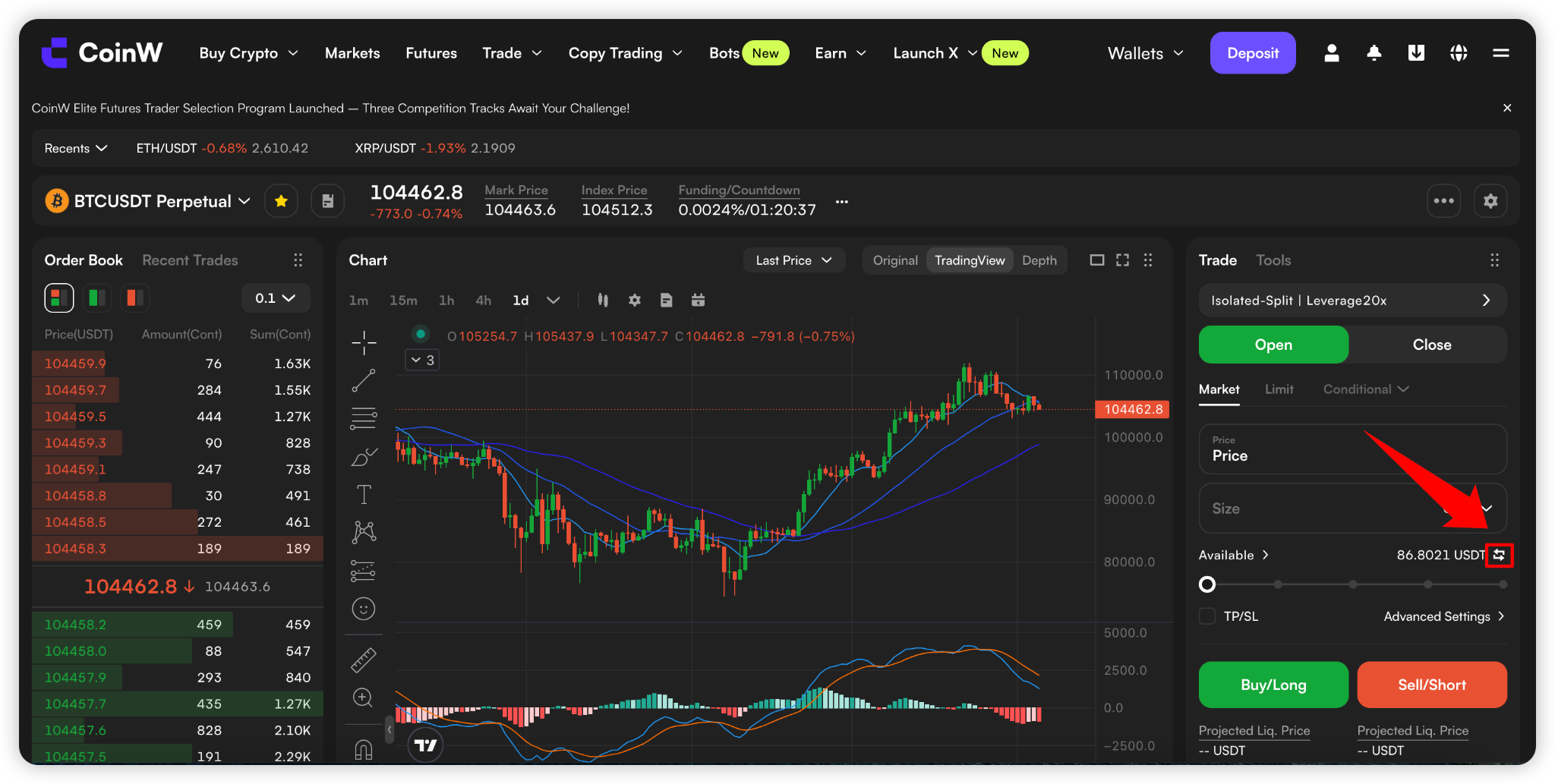
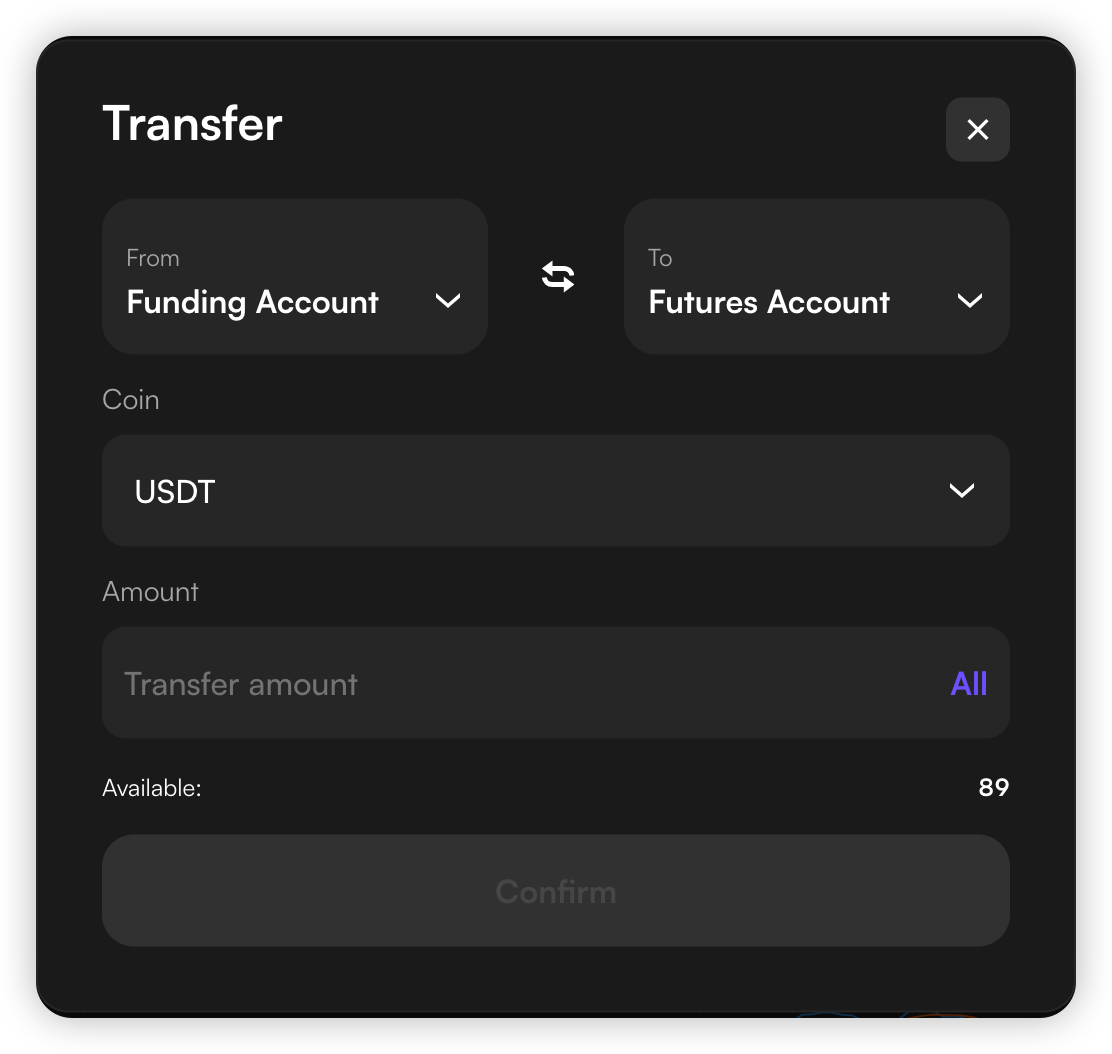
Before trading futures, you need to transfer USDT to your Futures account. You can do this by clicking the Transfer button next to the Available Margin section on the right.
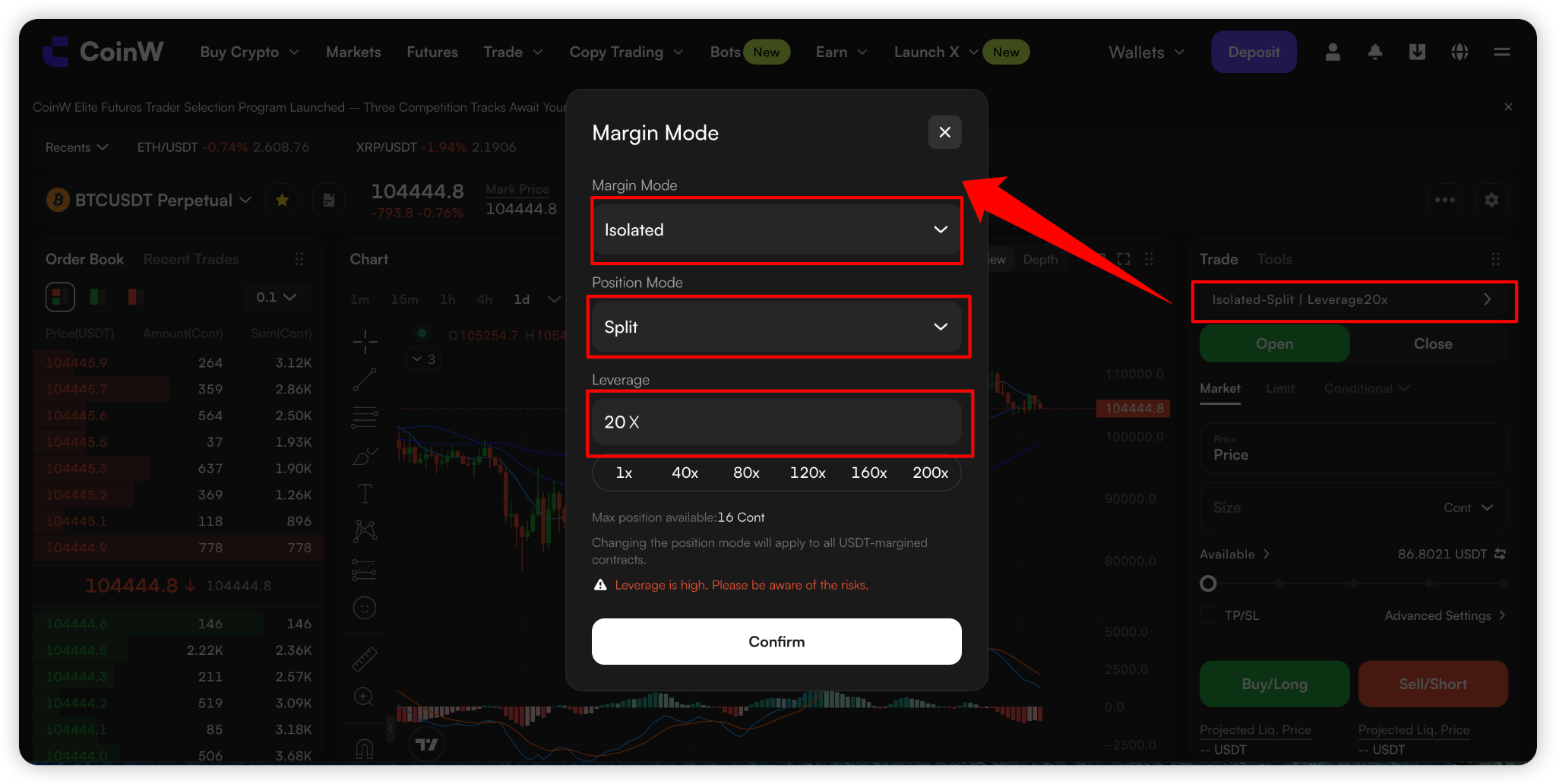
(3) Select Margin Mode, Position Mode and Set Suitable Leverage
Select cross margin or isolated margin mode.
In Cross Margin mode, all cross-margin trading pairs share the position margin;
In Isolated Margin mode, each trading pair has an independent position, and the position margins are isolated from each other.
Select Split mode or Merge mode.
In Split Mode, each newly opened position is displayed separately.
In Merged Mode, positions with the same direction and trading pair are combined into a single position, and the system will automatically recalculate the average entry price.
Set the leverage multiplier (The maximum leverage varies by trading pair. Please refer to the maximum leverage displayed on the interface for the most accurate information.).
The higher the leverage, the lower the required margin, but the higher the liquidation risk.
(4) Select a Preferred Order Type and Determine the Position Side
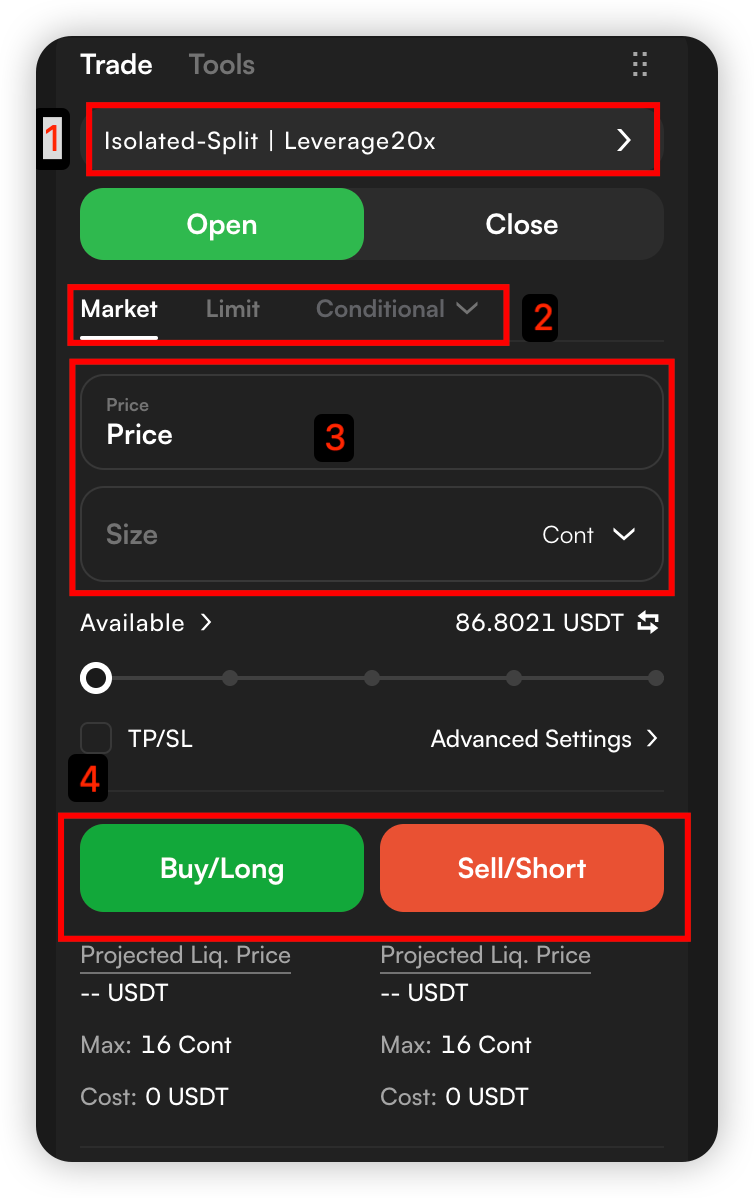
Select Limit, Market, Conditional or Advanced Limit to place an order.
A limit order is executed at your specified price and amount.
A market order is quickly filled at the best market price.
The conditional order and advanced limit order are executed when the trigger price is reached.
Enter the price and amount, determine the position side, and click “Buy (Long)” or “Sell (Short)” to place the order.
(5) Close Position
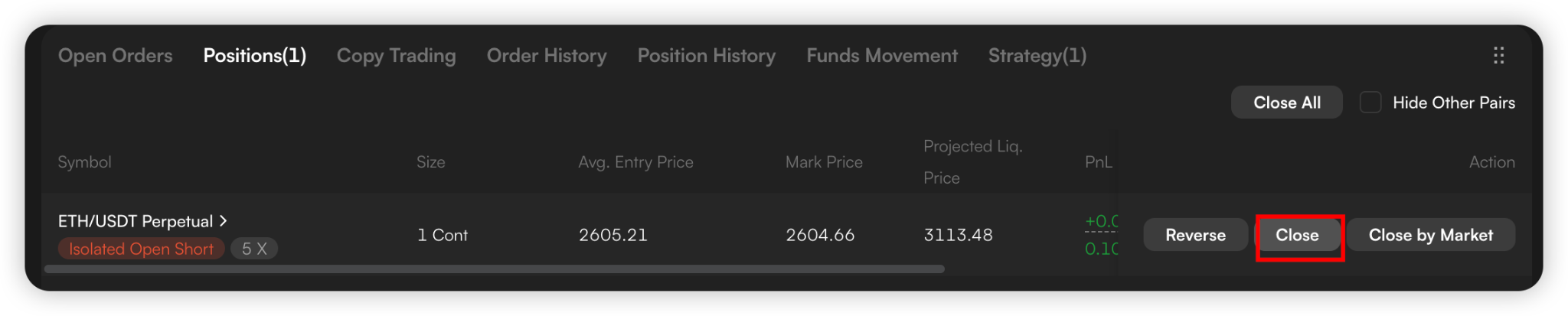
Click “Positions” at the bottom of the page to view your position information, monitor the liquidation price, or set take-profit/stop-loss (TP/SL) conditions.

When the expected return is reached, select Market, Limit, or Close All to close the position.
APP
(1) Select a Trading Pair
Open CoinW App and log in to your account.
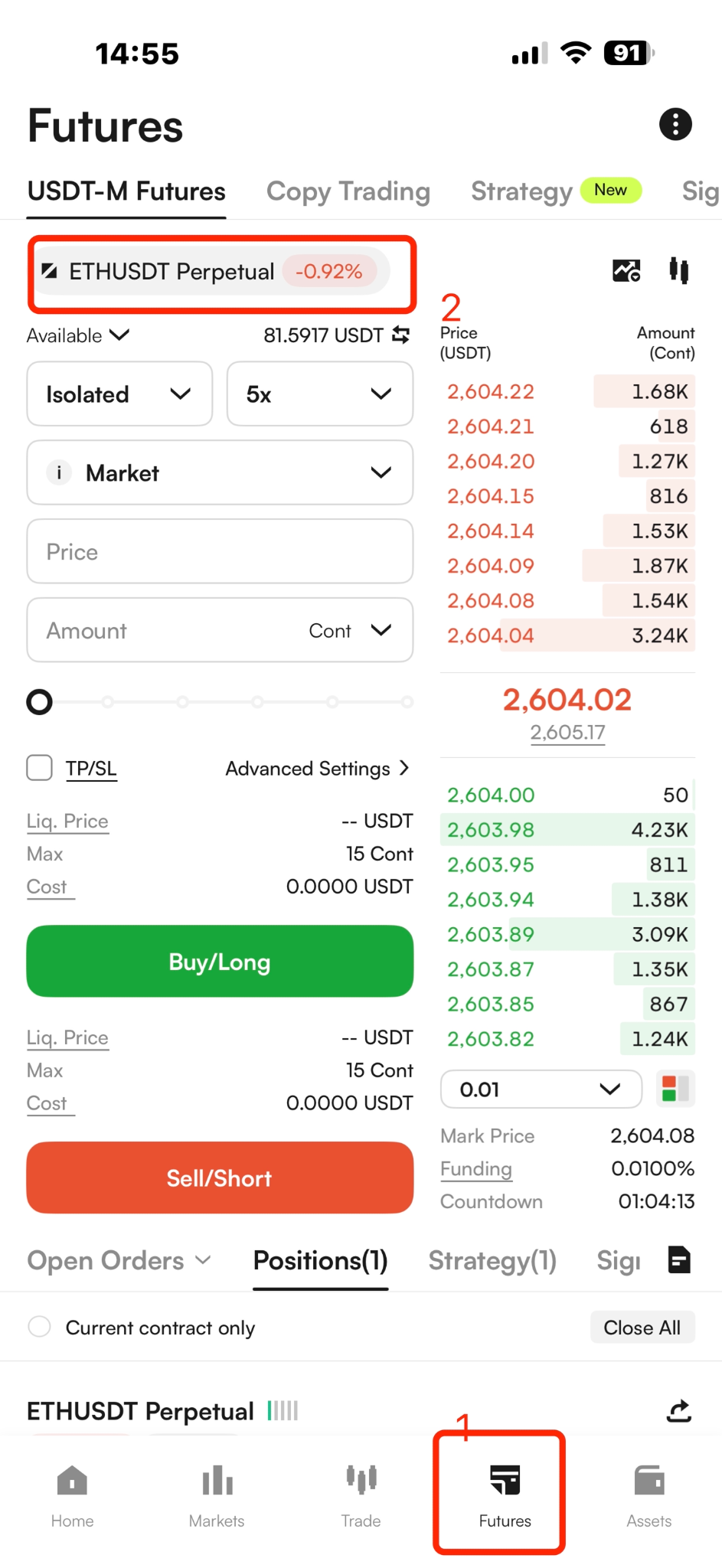
Tap “Futures” in the navigation bar at the bottom of the page.
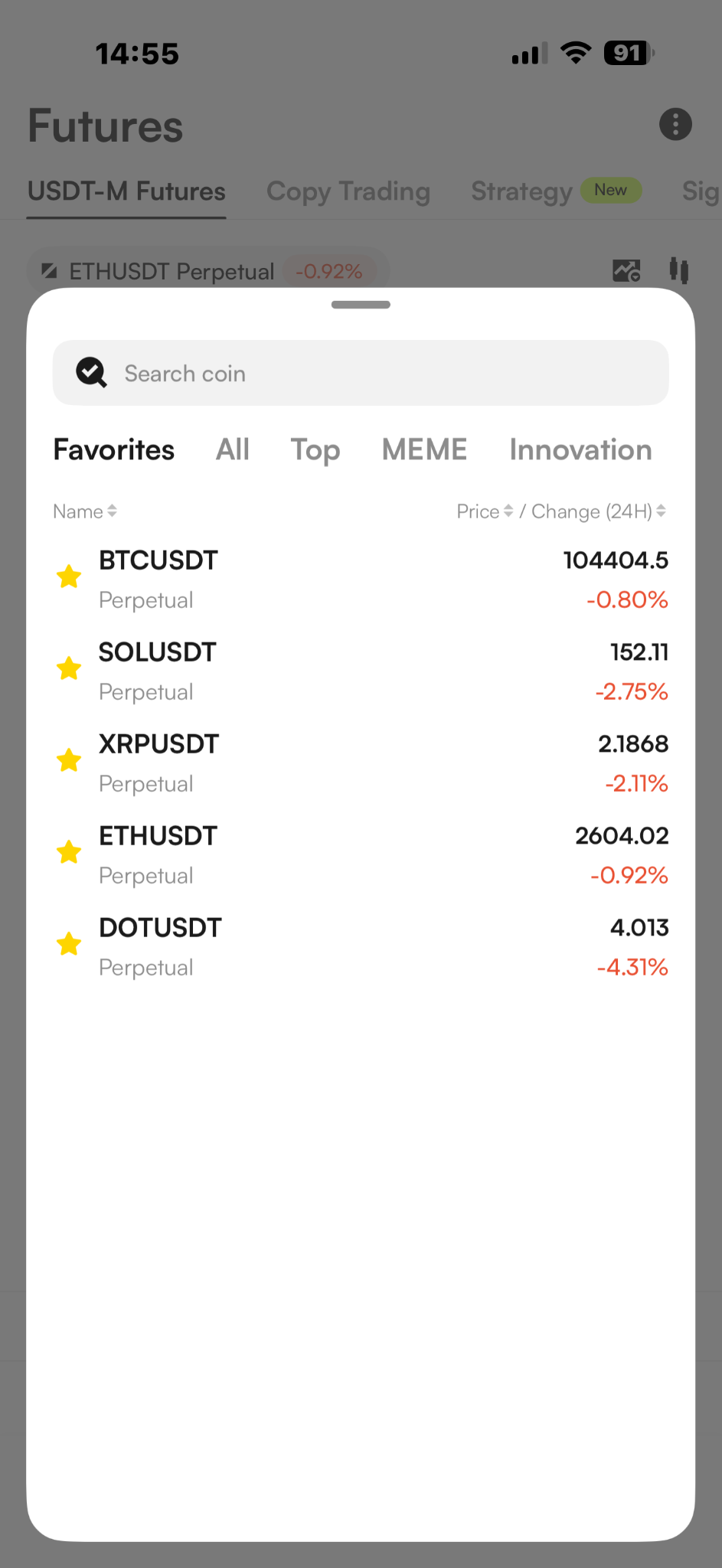
Tap the trading pair button at the top left corner of the page, and select the trading pair you want to trade with.
(2) Transfer Funds
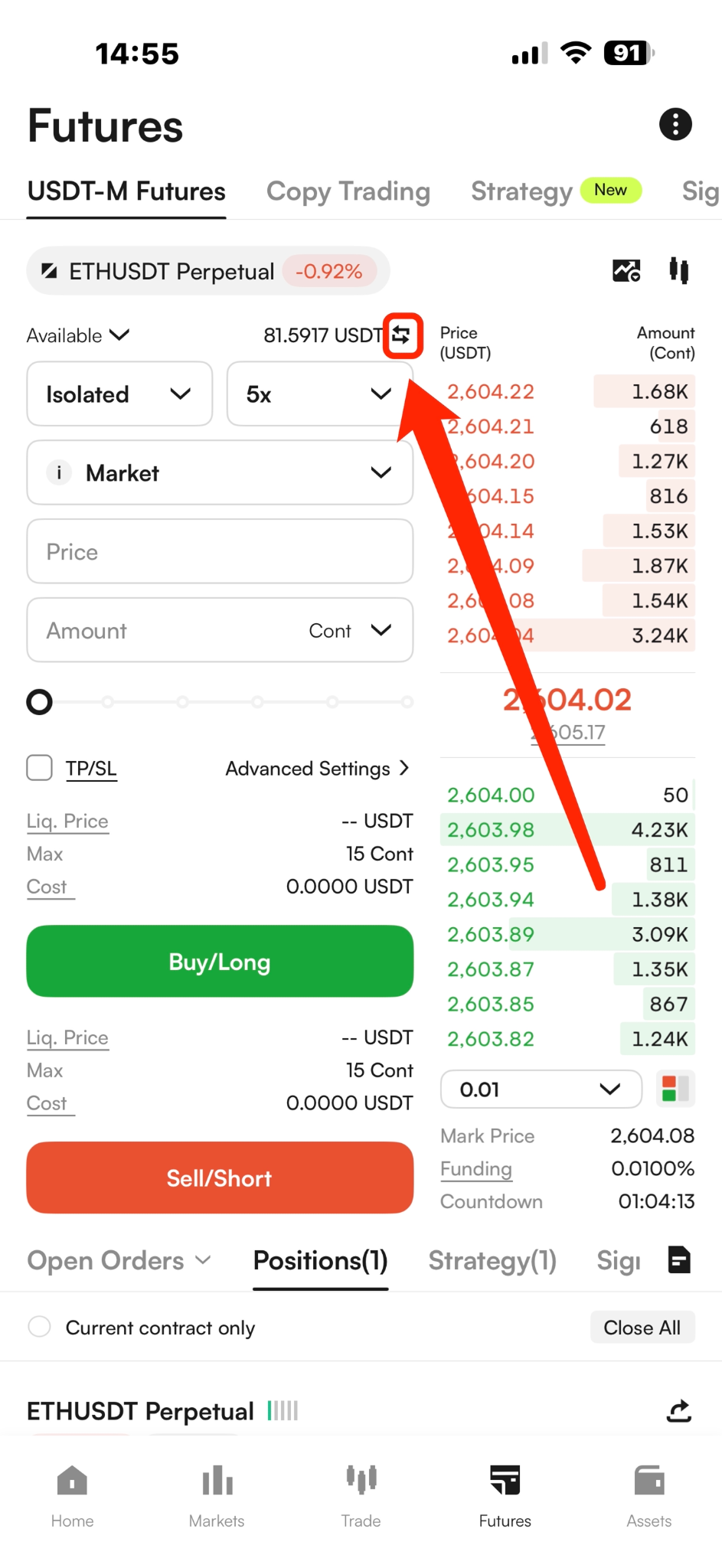
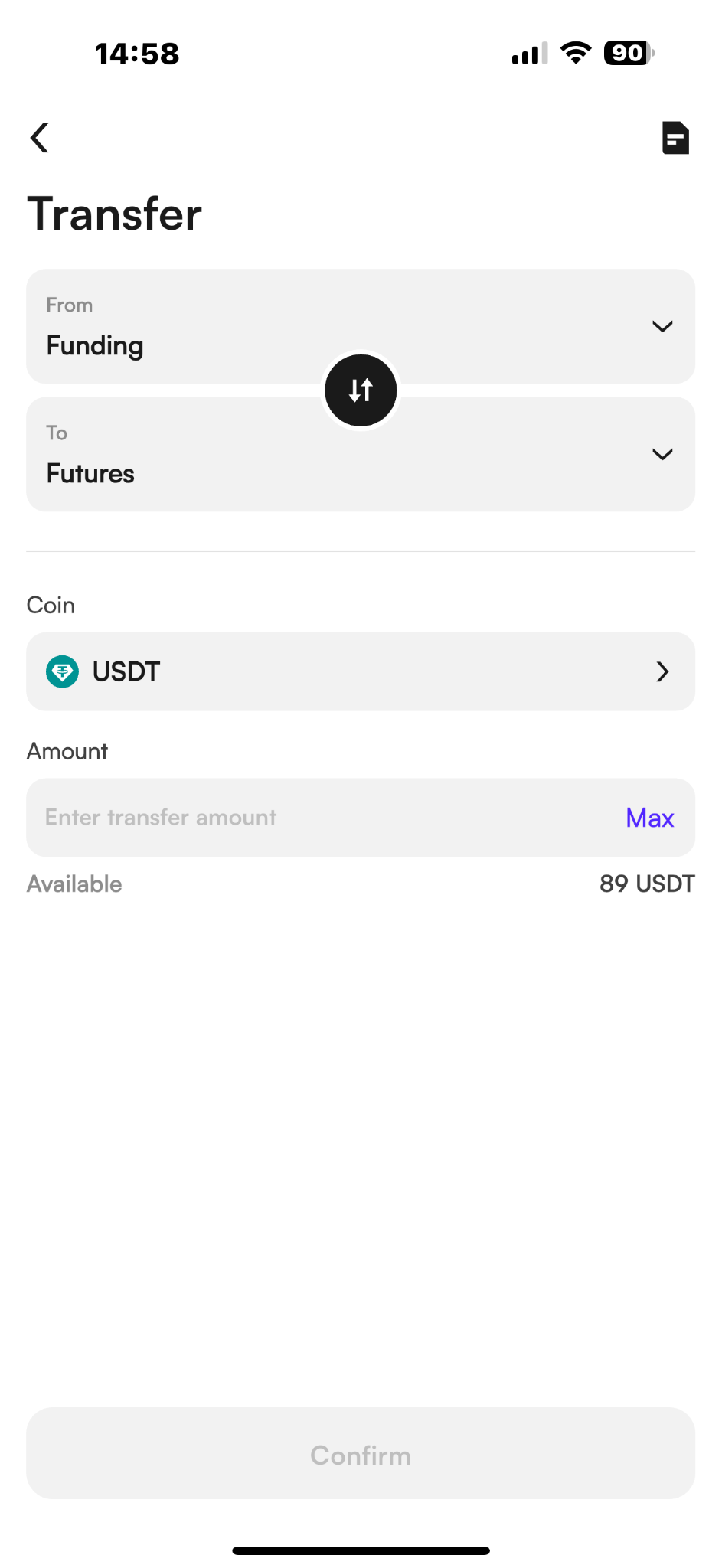
Before trading futures, you need to transfer USDT to your Futures account. You can click the Transfer button next to Available at the top of the page to make a transfer.
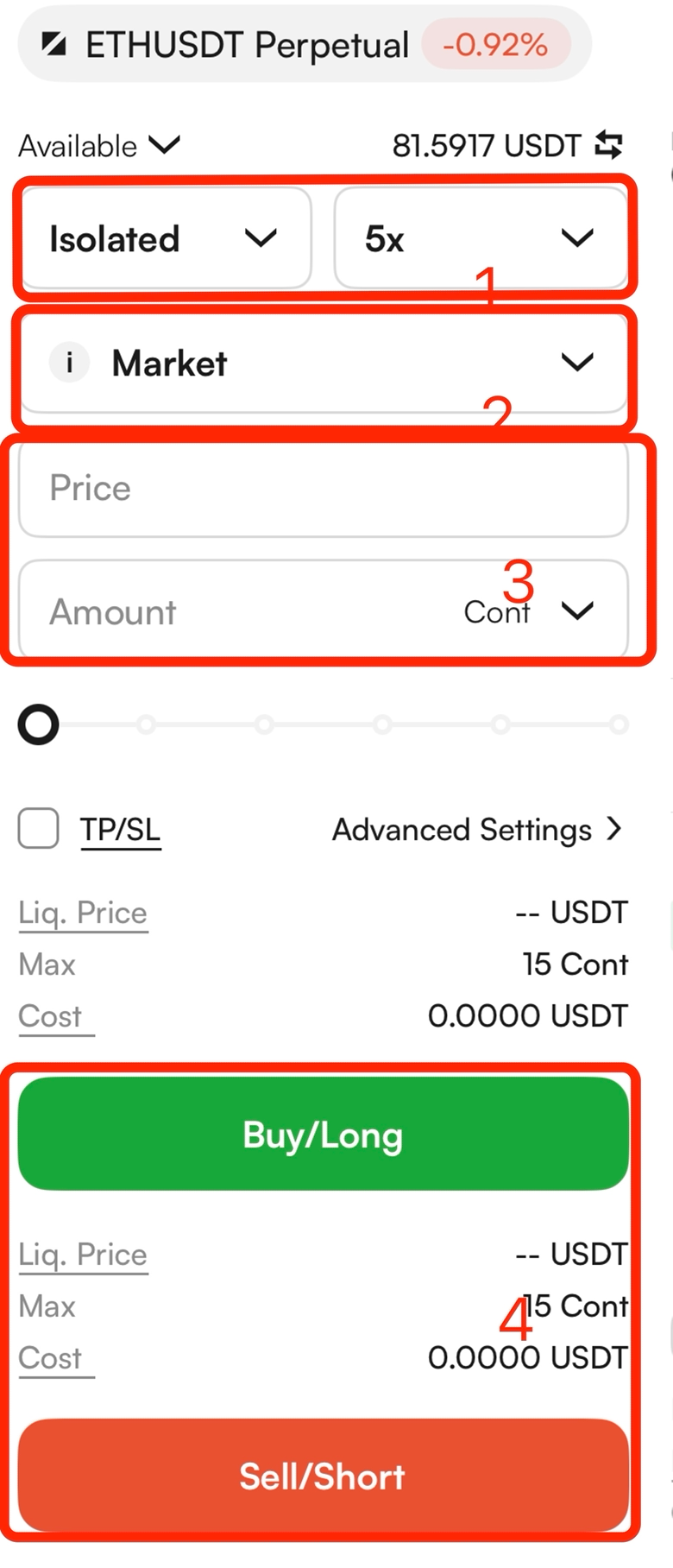
(3) Select Margin Mode, Position Mode and Set Suitable Leverage
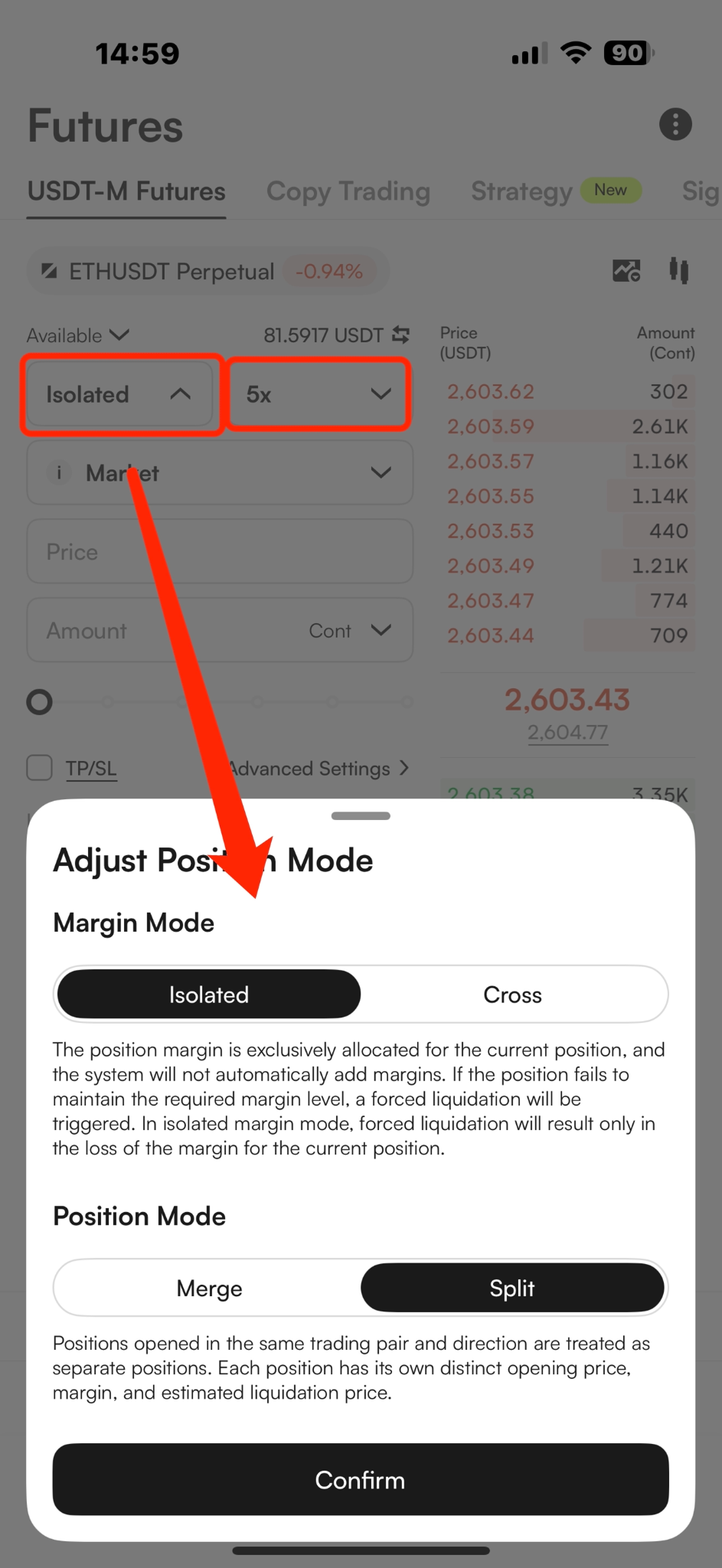
Select cross margin or isolated margin mode.
In Cross Margin mode, all cross-margin trading pairs share the position margin;
In Isolated Margin mode, each trading pair has an independent position, and the position margins are isolated from each other.
Select Split mode or Merge mode.
In Split Mode, each newly opened position is displayed separately.
In Merged Mode, positions with the same direction and trading pair are combined into a single position, and the system will automatically recalculate the average entry price.
Set the leverage multiplier (The maximum leverage varies by trading pair. Please refer to the maximum leverage displayed on the interface for the most accurate information.).
The higher the leverage, the lower the required margin, but the higher the liquidation risk.
(4) Select a Preferred Order Type and Determine the Position Side
Select Limit, Market, Conditional or Advanced Limit to place an order.
A limit order is executed at your specified price and amount.
A market order is quickly filled at the best market price.
The conditional order and advanced limit order are executed when the trigger price is reached.
Enter the price and amount, determine the position side, and click “Buy (Long)” or “Sell (Short)” to place the order.
(5) Close Position
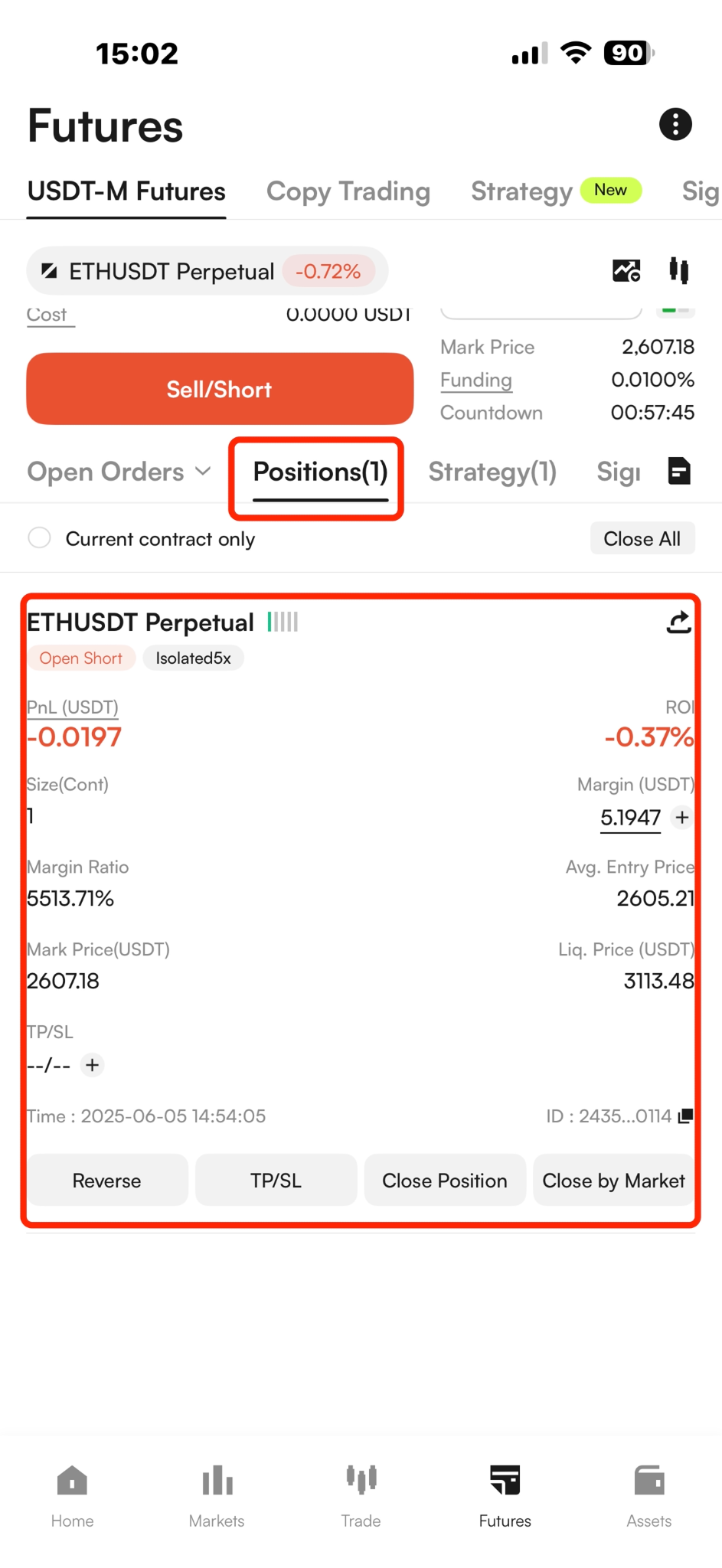
Click “Positions” at the bottom of the page to view your position information, monitor the liquidation price, or set take-profit/stop-loss (TP/SL) conditions.
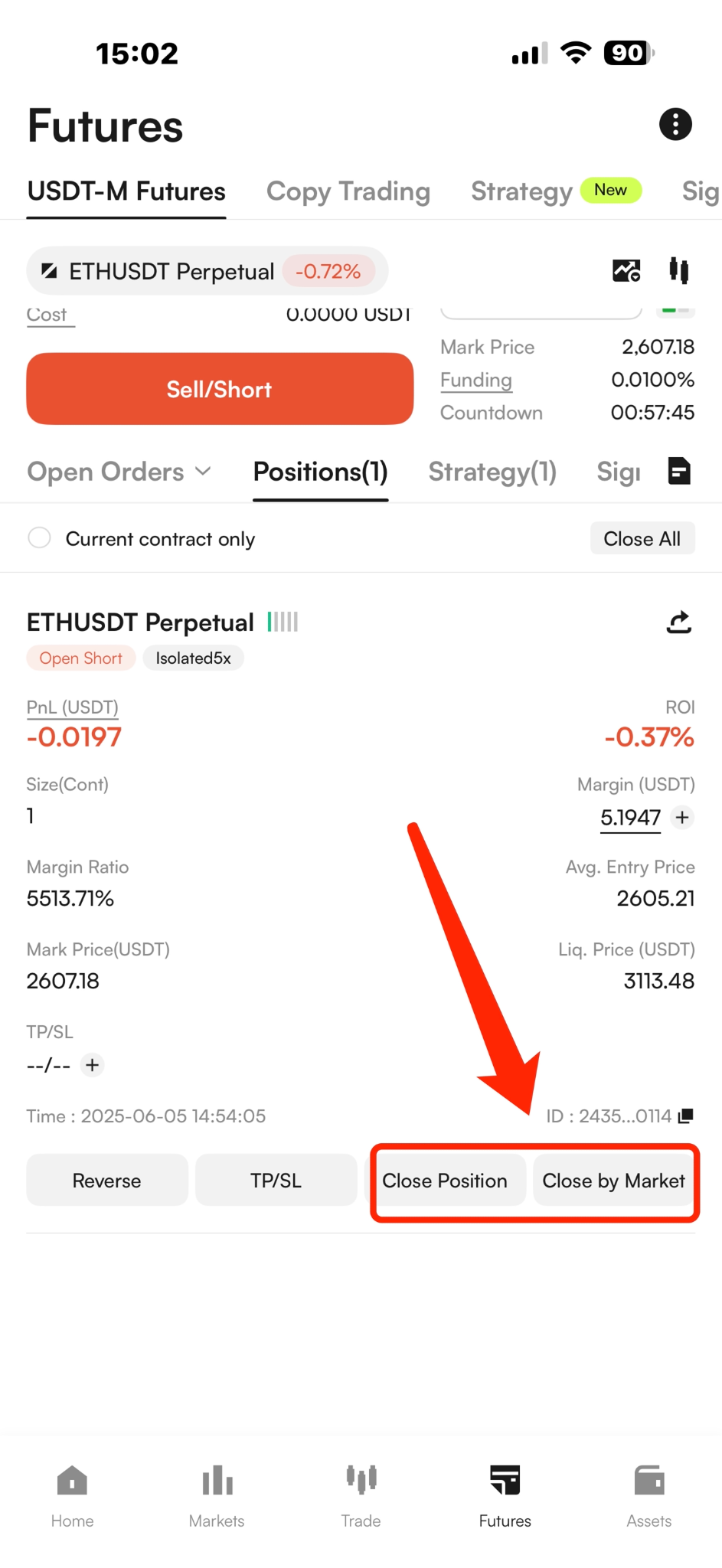
When the expected return is reached, select Market, Limit, or Close All to close the position.
WEB
(1) Select a Trading Pair
Log in to the CoinW official website:https://www.coinw.com/
Click on the “Futures” in the top navigation bar
Click the trading pair button at the top left corner of the page, and select the trading pair you want to trade with.
(2) Transfer Funds
Before trading futures, you need to transfer USDT to your Futures account. You can do this by clicking the Transfer button next to the Available Margin section on the right.
(3) Select Margin Mode, Position Mode and Set Suitable Leverage
Select cross margin or isolated margin mode.
In Cross Margin mode, all cross-margin trading pairs share the position margin;
In Isolated Margin mode, each trading pair has an independent position, and the position margins are isolated from each other.
Select Split mode or Merge mode.
In Split Mode, each newly opened position is displayed separately.
In Merged Mode, positions with the same direction and trading pair are combined into a single position, and the system will automatically recalculate the average entry price.
Set the leverage multiplier (The maximum leverage varies by trading pair. Please refer to the maximum leverage displayed on the interface for the most accurate information.).
The higher the leverage, the lower the required margin, but the higher the liquidation risk.
(4) Select a Preferred Order Type and Determine the Position Side
Select Limit, Market, Conditional or Advanced Limit to place an order.
A limit order is executed at your specified price and amount.
A market order is quickly filled at the best market price.
The conditional order and advanced limit order are executed when the trigger price is reached.
Enter the price and amount, determine the position side, and click “Buy (Long)” or “Sell (Short)” to place the order.
(5) Close Position
Click “Positions” at the bottom of the page to view your position information, monitor the liquidation price, or set take-profit/stop-loss (TP/SL) conditions.
When the expected return is reached, select Market, Limit, or Close All to close the position.
APP
(1) Select a Trading Pair
Open CoinW App and log in to your account.
Tap “Futures” in the navigation bar at the bottom of the page.
Tap the trading pair button at the top left corner of the page, and select the trading pair you want to trade with.
(2) Transfer Funds
Before trading futures, you need to transfer USDT to your Futures account. You can click the Transfer button next to Available at the top of the page to make a transfer.
(3) Select Margin Mode, Position Mode and Set Suitable Leverage
Select cross margin or isolated margin mode.
In Cross Margin mode, all cross-margin trading pairs share the position margin;
In Isolated Margin mode, each trading pair has an independent position, and the position margins are isolated from each other.
Select Split mode or Merge mode.
In Split Mode, each newly opened position is displayed separately.
In Merged Mode, positions with the same direction and trading pair are combined into a single position, and the system will automatically recalculate the average entry price.
Set the leverage multiplier (The maximum leverage varies by trading pair. Please refer to the maximum leverage displayed on the interface for the most accurate information.).
The higher the leverage, the lower the required margin, but the higher the liquidation risk.
(4) Select a Preferred Order Type and Determine the Position Side
Select Limit, Market, Conditional or Advanced Limit to place an order.
A limit order is executed at your specified price and amount.
A market order is quickly filled at the best market price.
The conditional order and advanced limit order are executed when the trigger price is reached.
Enter the price and amount, determine the position side, and click “Buy (Long)” or “Sell (Short)” to place the order.
(5) Close Position
Click “Positions” at the bottom of the page to view your position information, monitor the liquidation price, or set take-profit/stop-loss (TP/SL) conditions.
When the expected return is reached, select Market, Limit, or Close All to close the position.